The best budget laptop in Kenya is the cheapest complete setup that meets your actual requirements and passes inspection. Start with current configurations rather than a model family’s starting price. This guide follows advertised offers from below KSh 15,000 through higher spending limits, explains their compromises and shows when raising the budget may help. Every quoted offer is refurbished; the checked inventory does not establish a new-laptop option at these prices.
For modest office and study work, investigate the Latitude 5300 or an 8GB ThinkPad T480s. If you need more simultaneous apps, compare the listed 16GB T480s and EliteBook configurations. The very lowest-priced example has only 4GB RAM and requires particularly careful software checks.
Quick comparison: listed configurations and prices
| Model | Advertised configuration | Listed price | Listing shop |
|---|---|---|---|
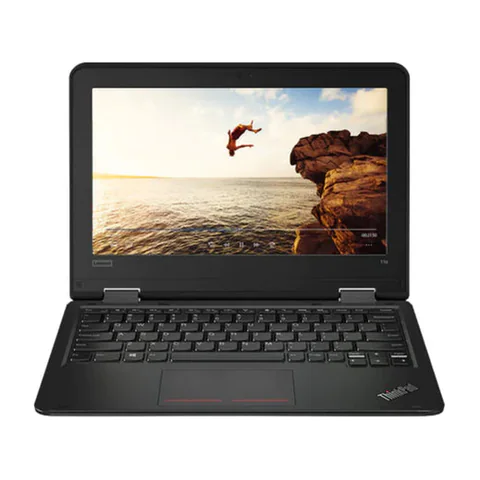
| Lenovo ThinkPad Yoga 11e | Intel Celeron; 4GB RAM; 128GB SSD | KSh 12,960 | Onit Computers Nairobi |
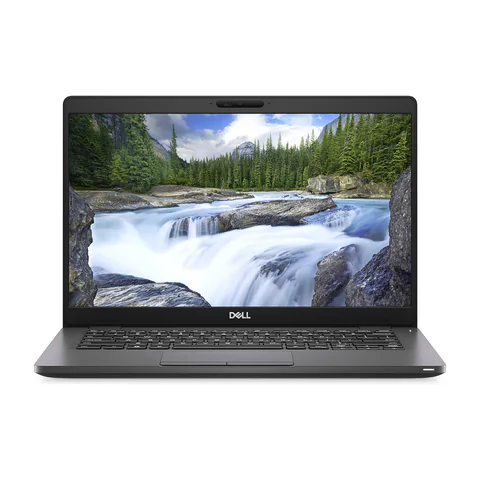
| Dell Latitude 5300 | Intel Core i5 (8th generation); 8GB RAM; 256GB SSD | KSh 19,980 | Onit Computers Nairobi |
| Lenovo ThinkPad T480s | Intel Core i7 (8th generation); 16GB RAM; 512GB SSD | KSh 29,700 | Onit Computers Nairobi |
| HP EliteBook 840 G8 | Intel Core i5 (11th generation); 16GB RAM; 256GB SSD | KSh 37,800 | Onit Computers Nairobi |
| HP EliteBook x360 1030 G8 | Intel Core i7 (11th generation); 32GB RAM; 512GB SSD | KSh 61,560 | Onit Computers Nairobi |
Prices checked on Laptop Prices Kenya on 20 November 2026. These are advertised configurations, all listed as Ex-UK refurbished. They are not checkout confirmations or a survey of every Kenyan seller. Confirm the exact unit, current total, battery condition and written terms with the named shop.
What each budget ceiling can currently include
The table below is a spending ladder, not a claim that each example is the best available laptop in its band. It uses specific configurations from the same catalog snapshot. A higher ceiling does not require you to spend the whole amount, and it does not establish a better battery, screen or warranty.
| Maximum laptop budget | Advertised example within the ceiling | Important trade-off |
|---|---|---|
| KSh 15,000 | ThinkPad Yoga 11e, Celeron, 4GB/128GB SSD: KSh 12,960 | Very limited memory; exact CPU and software support need confirmation |
| KSh 20,000 | Latitude 5300, 8GB/256GB SSD: KSh 19,980 | Little room for required extras at this ceiling |
| KSh 25,000 | ThinkPad T480s, 8GB/256GB SSD: KSh 22,140 | Check memory needs and the individual battery |
| KSh 30,000 | ThinkPad T480s, 16GB/512GB SSD: KSh 29,700 | Older advertised CPU generation; minimal accessory margin |
| KSh 35,000 | ThinkPad T490s, 16GB/512GB SSD: KSh 31,320 | Touch and unit condition need confirmation |
| KSh 40,000 | EliteBook 840 G8, 16GB/256GB SSD: KSh 37,800 | Smaller SSD than the 16GB ThinkPad examples |
| KSh 45,000 | The same KSh 37,800 configuration remains eligible | Use the margin for a verified need rather than an automatic upgrade |
| KSh 50,000 | EliteBook 840 G8, listed i7, 16GB/512GB SSD: KSh 47,520 | A higher CPU label does not prove the task will be faster |
| KSh 60,000 | EliteBook x360 1030 G8, 16GB/512GB SSD: KSh 59,400 | Confirm that the convertible feature is worth paying for |
| KSh 70,000–100,000 | Surface Laptop 4, 32GB/1000GB SSD: KSh 64,800 | This does not establish a gaming GPU or universal creative-software suitability |
These examples are advertised by Onit Computers Nairobi in the checked catalog. Verify the exact offer and total with the shop. There is no promise that every configuration remains purchasable at the displayed price when you enquire.
When the lowest-priced option is too limited
The Yoga 11e listing sits below KSh 15,000, but its 4GB RAM and 128GB SSD set clear constraints. The CPU is described only as Intel Celeron. That description is insufficient to confirm support for a particular Windows release or school application. Request the complete processor number before deciding.
Do not interpret inclusion in the price ladder as a general Windows recommendation. A machine can appear cheap while leaving little practical headroom. Ask whether the required browser, documents and meeting app can work together. If the trial fails, moving to another configuration may be better than adding small upgrades to an unsuitable base.
Under KSh 25,000: compare basic configurations
The Latitude 5300 and lower-memory T480s examples both list 8GB RAM and a 256GB SSD. They provide a clearer starting point for modest workloads than a 4GB example, but neither is automatically suitable for every user. Screen preference, software compatibility and condition should decide between them.
If a shop proposes a memory upgrade, ask for the installed configuration and final price in writing. An upgrade promise does not make an 8GB advertised price a valid comparison with a ready 16GB offer.
Under KSh 30,000–40,000: choose what improves your work
The listed 16GB/512GB T480s provides more memory and storage below KSh 30,000. The EliteBook 840 G8 example reaches a newer advertised CPU generation below KSh 40,000, with a smaller SSD. These are different advantages, so choose according to the workload rather than a single specification.
For spreadsheets and browser multitasking, test the busiest normal setup. For a large personal file collection, calculate storage needs first. If both candidates pass the task test, condition and required extras may settle the decision.
Why a larger budget does not prove a specialist fit
Spending KSh 60,000 or KSh 100,000 does not guarantee gaming or engineering capability. The checked workstation offers leave the exact graphics chip unconfirmed. Do not substitute a large budget or a workstation name for the missing evidence.
Likewise, no new laptop appeared in the checked 92-offer inventory. For a new laptop below KSh 40,000, use a quotation request and compare the exact response. We cannot name a verified new configuration from this snapshot.
Calculate the complete purchase cost
- Record the exact advertised laptop configuration.
- Add required upgrades, a suitable charger, software and delivery.
- Request battery evidence and written return/warranty terms.
- Compare the total with the actual spending limit.
- Keep optional touchscreens, accessories and CPU upgrades behind essential needs.
Use the used-laptop inspection checklist and Microsoft’s compatibility guidance. A seller’s installed operating system does not independently prove support.
Common questions
Which budget band offers the best value?
The right band depends on your required work and the condition of the actual unit. The table identifies configuration changes, not a universal value winner.
Can I find a new laptop under KSh 40,000 here?
The checked offers do not establish one. Ask shops for current new-laptop quotes and verify the exact CPU, memory, storage and written terms.
Should I spend more for touch?
Only if touch improves a task you actually perform. Confirm active-pen support separately if handwriting is the reason.
Find the best budget laptop in Kenya by comparing usable configurations and full costs. Check current catalog offers, or request a quote with your firm spending limit. Use price alerts when timing is flexible.
Research method and sources
This AI-assisted guide compares published specifications and advertised marketplace offers checked on 20 November 2026. It is not a hands-on review. Individual battery life, exact CPU part numbers and any omitted graphics details remain unverified. Laptop Prices Kenya helps buyers compare independent shops; the selling shop handles the sale and its own warranty terms.
Leave a Reply