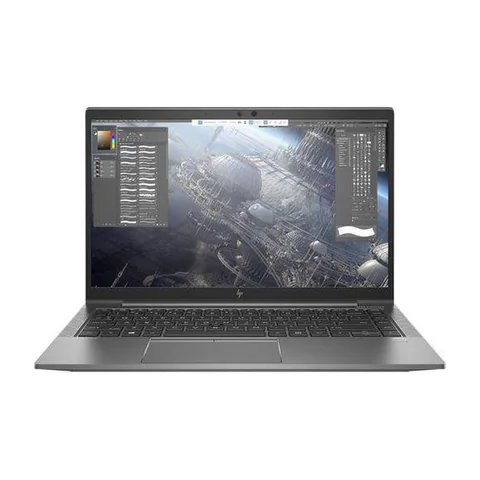
The best laptop for small business owners in Kenya is the one that supports the business without creating avoidable downtime. Start with the tasks that bring in revenue: invoices, stock records, client communication and the software your staff use. For a busy owner switching between several apps, a 16GB RAM laptop with an SSD is a useful starting point. However, buying the right configuration is only part of the decision. You also need clear repair arrangements, licensed software and a plan for recovering important files.
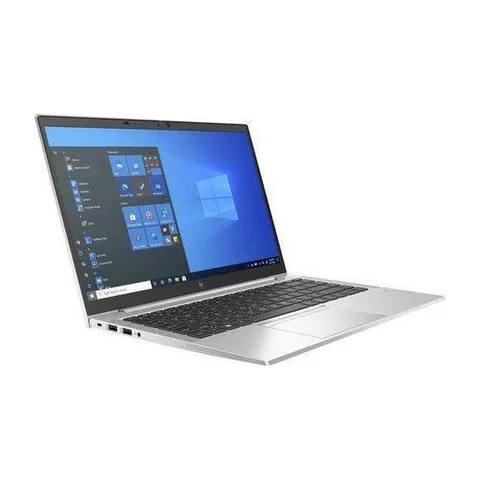
Compare the HP EliteBook 850 G8 if you want to investigate a larger-screen configuration. Consider the 840 G8 for a 14-inch option with the same advertised RAM capacity. The ThinkPad T480s offers a lower listed price and more SSD space, with an older processor generation to assess.
Quick comparison: listed configurations and prices
| Model | Advertised configuration | Listed price | Listing shop |
|---|---|---|---|
| HP EliteBook 850 G8 | Intel Core i5 (11th generation); 16GB RAM; 256GB SSD | KSh 37,800 | Onit Computers Nairobi |
| HP EliteBook 840 G8 | Intel Core i5 (11th generation); 16GB RAM; 256GB SSD | KSh 37,800 | Onit Computers Nairobi |
| Lenovo ThinkPad T480s | Intel Core i7 (8th generation); 16GB RAM; 512GB SSD | KSh 29,700 | Onit Computers Nairobi |
Prices checked on Laptop Prices Kenya on 20 November 2026. These are advertised configurations, all listed as Ex-UK refurbished. They are not checkout confirmations or a survey of every Kenyan seller. Confirm the exact unit, current total, battery condition and written terms with the named shop.
Match the laptop to the business role
A business owner does not always need the same computer as every employee. Someone handling stock and invoices may work at one counter all day. A salesperson may carry a laptop between clients. A designer may need software-specific graphics support that neither person uses.
Therefore, prepare a one-line brief for each role. Include the required apps, whether the device travels, connected equipment and expected file sizes. You can then compare suppliers against a common request rather than accepting whichever configuration a shop recommends first.
| Role | Main purchasing question | Useful acceptance test |
|---|---|---|
| Owner or manager | Can it handle concurrent accounts, documents and calls? | Run a representative busy-hour workload |
| Counter or administration staff | Does it work with the actual printer and business software? | Print a sample and enter test transactions |
| Mobile staff | Can the full kit travel reliably? | Check battery evidence, charger and required ports |
How these three configurations differ
The EliteBook 850 G8 offer includes a listed 15.6-inch screen, 16GB RAM and a 256GB SSD. The larger format may suit an owner who works with side-by-side documents. However, the screen size alone does not prove resolution, panel quality or keyboard layout. Ask for photographs and test whether the actual layout suits number entry.
The EliteBook 840 G8 configuration offers a 14-inch screen, 16GB RAM and a 256GB SSD. It may suit a buyer moving between an office and client meetings. Confirm the actual unit’s weight, battery health and included charger. We have not measured its portability or runtime.
The ThinkPad T480s offer gives you a listed 512GB SSD and 16GB RAM at a lower price. That leaves a larger margin for business accessories in this comparison. Its older CPU generation is the main specification trade-off. Check software support and condition before treating the saving as a clear win.
Calculate the cost of ownership, not just the purchase price
Write down every cost that must be paid before the laptop becomes useful. Include the correct charger, essential upgrades, software, installation and delivery. If a shop bundles Office or another paid application, ask what licence you receive and whether it belongs to your business. An installed program is not proof of a valid transferable licence.
Next, decide what happens if the laptop stops working. A warranty can help with a covered repair, but it does not automatically give you a replacement computer or restore lost files. Ask the supplier about turnaround times and whether the terms cover labour, parts and the battery.
You can compare two offers with a simple worksheet: purchase cost plus required setup costs, followed by a separate list of unresolved risks. Keep uncertain repair costs separate rather than pretending they are known. A cheaper machine with unclear service terms may still be acceptable, but make that a conscious decision.
Buying two laptops: consistency can matter more than a badge
If you need two devices, compare the combined setup rather than doubling one attractive sticker price. Similar chargers and software can simplify support. However, identical model names do not ensure identical screens, memory or condition. Record each serial number and configuration separately.
Suppose one member of staff mainly handles documents while the owner uses several demanding apps. Giving the larger memory configuration to the owner may be more useful than buying two higher-tier CPUs. Use actual tasks to allocate the budget.
Before purchase, verify compatibility with your business application supplier. This is especially useful for older printer drivers, accounting add-ins or desktop systems. Microsoft also explains the choice between 32-bit and 64-bit Office. Check legacy add-ins before changing editions.
Create a simple handover checklist
- Record the serial number, CPU, RAM, SSD and accessories on the receipt.
- Install only the software the role needs and retain the licence records.
- Create separate staff accounts and document who can administer the device.
- Set up a backup and test restoring a non-sensitive sample file.
- Confirm who to contact for repairs and where the written terms are stored.
This checklist also helps when an employee changes roles. The business should retain control of its files and accounts. Avoid putting every important service under one person’s private email address without a recovery plan.
For refurbished devices, work through the physical inspection checklist. Check the actual processor against Microsoft’s Windows 11 requirements if that operating system is part of your plan.
Common buying questions
Should a small business buy refurbished laptops?
They can be worth comparing when budgets are tight. Condition, support, compatibility and written terms should decide whether a particular unit makes sense. Refurbished status alone does not establish either good or poor value.
Do I need a Core i7 for invoices and stock records?
Check the application and workload first. CPU generation, memory and storage all matter. A Core i7 label on its own cannot answer the question.
Can Laptop Prices Kenya provide the warranty?
The independent selling shop sets the transaction and warranty terms. Laptop Prices Kenya provides comparison and quotation routes. Confirm the responsible supplier in writing before paying.
Choose the best laptop for small business owners in Kenya
Build a brief around the role, compare complete setup costs and keep service terms beside the price. Ask shops for itemised business quotes, stating the number of devices, required software and delivery location. The business hub can help you start the shortlist.
Research method and sources
This AI-assisted guide compares published specifications and advertised marketplace offers checked on 20 November 2026. It is not a hands-on review. Individual battery life, exact CPU part numbers and any omitted graphics details remain unverified. Laptop Prices Kenya helps buyers compare independent shops; the selling shop handles the sale and its own warranty terms.
Leave a Reply